
Baritastic - Bariatric Tracker
BariAppsMedical
4.613.44K Reviews
- Version
- 5.1.0
- Installs
- 500.00K
- Age Rating
- Everyone
Screenshots
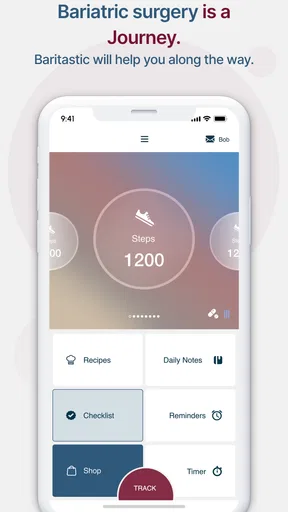
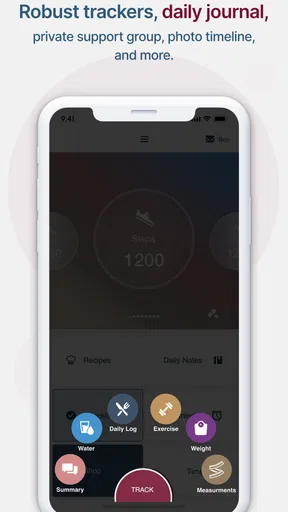
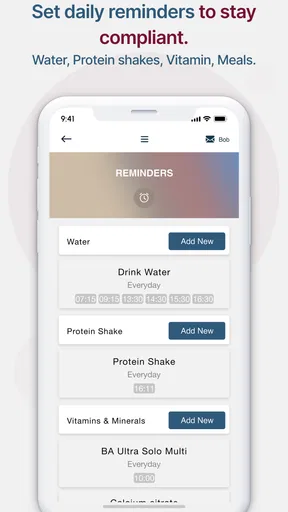
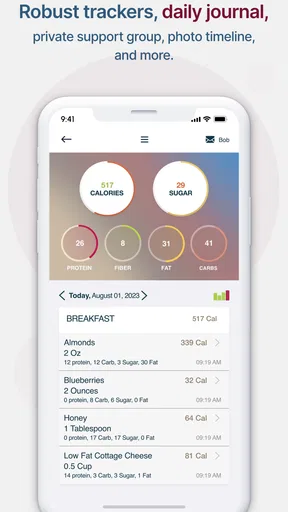
Our Review of Baritastic - Bariatric Tracker
 Analysis by Appyee
After bariatric surgery, the difficult part is often not understanding the broad rules. It is keeping track of small, repeated decisions while your routine, appetite, energy and confidence are changing. Baritastic is built for that period. BariApps presents it as a medical app for people managing gastric bypass, gastric sleeve, lap band or balloons, and my experience is that its main value comes from bringing those daily observations into one place instead of scattering them across notes, memory and separate health tools.
I would not describe it as a replacement for a surgeon, dietitian or clinic. I see it more as a personal tracking companion that helps turn recovery into a visible routine. That distinction matters: the app can make information easier to record and discuss, but it cannot decide whether a symptom is harmless, whether a meal is appropriate for your stage, or whether a change needs medical attention.
From a difficult starting point to a usable daily routine
The starting condition for many users is messy. You may be following a post-operative plan, trying to remember fluids, meals and supplements, and wondering whether a difficult day is part of normal adjustment. A paper diary can work, but it is easy to leave at home. A general calorie counter may be too broad, while a standard weight-loss app may not reflect the specific context of bariatric care. Baritastic is more focused because its purpose is tied to the kinds of surgery and treatment paths it names.
That focus is also why I would choose it over a generic food diary for this particular situation. The point is not simply to collect calories. A bariatric tracker is useful when the record needs to sit beside the changing stages of recovery and the questions you want to raise at an appointment. The app gives that process a dedicated home, which can reduce the mental load of remembering what happened yesterday or earlier in the week.
Setup is best approached as a calm first step rather than something to rush through. I would keep the instructions from the care team nearby and enter information carefully, especially if the app asks about the surgery path or the way you want to monitor progress. A tracker is only as useful as the context behind its entries. If you select or record something incorrectly, later patterns may be misleading even when the individual entries look tidy.
One practical tip is to decide in advance what you will record consistently. Trying to capture every possible detail can make the routine feel like another chore. A smaller set of honest, repeatable entries is usually more useful than a perfect record that lasts only a few days. This is one of the less obvious strengths of a dedicated tracker: it encourages you to think in terms of a continuing recovery workflow, not a single nutrition calculation.
Recording the day without turning recovery into a spreadsheet
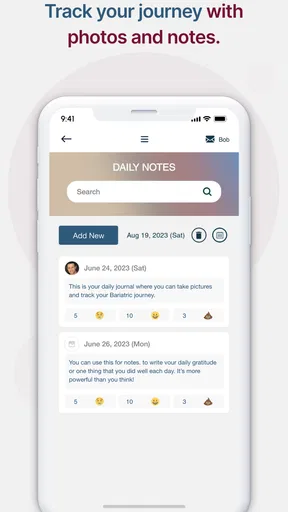
In everyday use, I would open the app around the moments that already exist in my routine: after eating, when checking progress, or when reviewing the day before bed. That approach is easier than waiting for a large block of free time. The goal is to make logging follow life rather than forcing life to revolve around logging.
A realistic example would be a person returning to work after surgery. Breakfast may happen at home, a small meal may be taken during a short break, and fluids may be spread across the workday. Instead of trusting memory at night, the user can make brief entries as each part happens. If an uncomfortable episode occurs, noting it close to the event can also make the later conversation with a professional more precise than saying, “I think it happened sometime yesterday.”
The useful outcome is not a decorative history. It is a clearer link between what you consumed, how your day felt and what you want to ask next. That can be especially helpful when the scale does not move in the way you expected. A single result can be discouraging, but a broader record may show that the real issue is inconsistent hydration, skipped meals, a difficult work schedule or a pattern worth discussing with the care team.
I would still avoid treating any trend inside the app as a diagnosis. A chart or log can point to a question; it cannot provide the clinical answer. If you experience severe pain, repeated vomiting, signs of dehydration, bleeding, breathing difficulty or another urgent concern, the right handoff is to a qualified medical service, not to more time spent entering data.
The handoff from private notes to professional conversations
The strongest workflow is not “log everything and obey the screen.” It is “log enough to make the next conversation better.” At an appointment, a vague memory can lead to broad advice, while a consistent record may help you explain when a problem appears, what preceded it and whether it is becoming more frequent. That makes the app valuable even when the final decision happens outside it.
I would prepare for an appointment by reviewing the recent entries and writing down the two or three questions that matter most. This is a concrete way to prevent the visit from becoming a rushed attempt to remember the entire week. It also helps separate observations from assumptions. For example, “I felt uncomfortable after this type of meal on several occasions” is more useful than deciding on your own that one ingredient is definitely the cause.
There is an important limitation in this handoff. A tracker does not automatically guarantee that a clinician will see your information, and I would not assume that an entry replaces the records used by your hospital or clinic. If your care team has a preferred reporting method, use that method. Baritastic can help you organize what to say, but you may still need to show or summarize the relevant information yourself.
This is also where privacy habits matter. Because the app concerns health and surgery, I would review what I am entering, avoid recording unnecessary personal details in free-text areas, and use the device protections I normally rely on. I would not install it solely because a tracker sounds reassuring; I would choose it because its bariatric focus fits the way I want to manage my own information.
What the accumulated record can change
After several days or weeks of consistent use, the result is a more concrete picture of daily behavior. The benefit is often less dramatic than a sudden transformation. It may be noticing that a particular time of day repeatedly causes skipped fluids, recognizing that work makes meal planning harder, or arriving at a follow-up visit with a clearer account of what has been happening.
That kind of visibility can support better conversations about adjustments. It can also reduce the common habit of judging progress from one weigh-in or one difficult meal. I find the app most convincing when it is used as a feedback loop: record what happened, notice a pattern, discuss the pattern with the right professional, then adjust the routine and continue observing.
A second non-obvious use is preparation for transitions. Early recovery and long-term maintenance do not feel identical, so the most useful tracking habit may change over time. At first, the record can help you stay close to the plan and notice problems. Later, it can help you identify the routines that remain sustainable when work, travel or social meals interrupt the ideal schedule. The app is therefore more useful when treated as a flexible journal for a changing phase of life, not as a permanent test that you must pass every day.
I also like the possibility of using the record to improve self-compassion. Bariatric care can make people focus intensely on compliance, and an imperfect day may feel like failure. A neutral log can show what actually happened without turning it into a moral judgment. That does not remove responsibility, but it makes the next decision more practical. The app works best when it supports honest observation rather than guilt.
Where the workflow becomes frustrating
The main friction is the effort required to keep entering information. No tracker can remove that. On busy days, repeated logging may feel intrusive, and a person dealing with nausea, fatigue or emotional stress may not want to interact with a phone after every eating or drinking moment. If you know you dislike detailed tracking, the app may become another abandoned health project rather than a useful companion.
There is also a risk of over-monitoring. Some users may become anxious about missing an entry or interpreting every fluctuation as a warning. I would set a realistic routine and accept that an incomplete record can still be useful. The purpose is to support care, not to create a second source of pressure.
Another boundary is specialization. Baritastic makes sense for someone whose needs match bariatric surgery or balloon-related tracking. It is not the obvious choice for a person seeking a broad fitness dashboard, a general diabetes-management system, a pregnancy journal or a comprehensive medical record. In those cases, a tool designed specifically for that condition may offer a better workflow, even if it is less focused on bariatric recovery.
Compared with a paper notebook, the app is easier to carry and easier to revisit, but paper may feel faster for someone who dislikes screens. Compared with a general nutrition app, it is more closely aligned with bariatric concerns, while a general app may be better for users who want extensive food databases, exercise planning or wider lifestyle tools. Compared with a clinic portal, it is more suited to personal day-to-day tracking, whereas the portal remains the more appropriate place for official medical communication and care instructions.
Those trade-offs are important because the best tool is the one you will actually use. I would rather see a person maintain a simple, accurate notebook and bring it to an appointment than download Baritastic, log intensely for two days and stop. The app earns its place when its focus matches the user’s situation and its routine is light enough to survive ordinary life.
Practical questions before choosing it
The app is free, which removes a financial barrier for someone who wants to try a dedicated bariatric tracker without committing to a subscription. It is listed for Everyone, but that age label should not be confused with medical suitability: the relevant question is whether the user’s surgery or treatment context matches the app’s purpose and whether a responsible adult or clinician should be involved.
Device compatibility deserves attention before installation. The current version is 5.1.0 and requires operating system version 10 or later. If your phone is older, checking the system requirement first can save an unnecessary download attempt. I would also keep the app updated when possible, while remembering that an update does not change the need to follow the instructions from your own care team.
Its long presence in the category is reassuring for people who prefer an established tool: BariApps released it on September 4, 2014. It has grown to over 500 thousand installs, with an average rating of 4.6 from around 27 thousand ratings and roughly 13 thousand written reviews. Those figures suggest that many people find the concept useful, but they should not replace your own judgment about whether the logging style fits your recovery.
Before relying on it, I would answer a few personal questions. Will I use it during the actual moments when I need to record something, or only remember after the day is over? Do I want a focused bariatric tool, or am I really looking for exercise, meal discovery or broader health management? Can I distinguish a tracking prompt from medical advice? If the answers are clear, the app is easier to use well.
My recommendation after following the full workflow
I would recommend Baritastic to someone who is preparing for or living through bariatric care and wants one focused place to build a daily record. Its best result is not that it makes recovery effortless. Its best result is that it helps convert scattered experiences into information you can review, learn from and take into a professional conversation.
I would be more cautious about recommending it to someone who feels overwhelmed by logging, wants a general-purpose wellness platform, or expects the app to interpret symptoms and make treatment decisions. Those users may be better served by a simpler personal method or by a tool designed around their specific condition. The app also cannot compensate for an unclear care plan, and it should never delay contacting a clinician when something feels urgent.
For the right person, the workflow is straightforward: begin with the instructions and recovery context, record consistently without chasing perfection, review the emerging pattern, and hand meaningful questions to the surgeon or dietitian. That is where the app shows its real usefulness. It is a practical bridge between what happens during an ordinary day and the better-informed conversations that shape ongoing bariatric care.
Verdict
Strengths of Baritastic - Bariatric Tracker
- Tracks meals, fluids, vitamins, weight, and symptoms in one place.
- Custom reminders help maintain supplement and hydration routines.
- Supports barcode scanning for quicker food and nutrition logging.
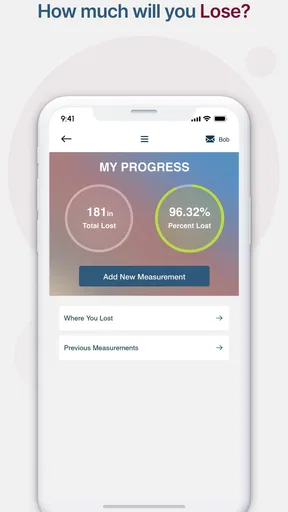
- Progress charts make weight and habit changes easy to review.
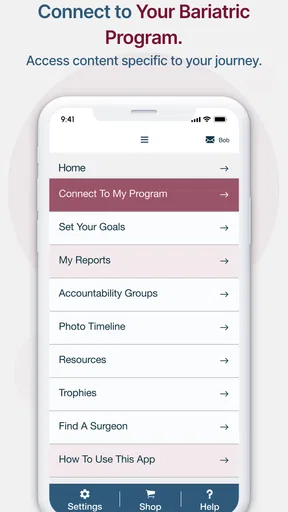
- Can connect users with bariatric clinics and care teams.
Limitations of Baritastic - Bariatric Tracker
- Many features are most useful after bariatric surgery or under clinical guidance.
- Food entries may require manual corrections when serving sizes vary.
- Frequent reminders can feel overwhelming during busy days.
- Some clinic-connected tools depend on provider participation and setup.
- The detailed tracking may take time to maintain consistently.
Similar Picks in This Category
View All
WebMD: Symptom Checker
WebMD, LLC4.1

Microphone Amplifier
DOSA Apps4.2

Anatomy Learning - 3D Anatomy
3D Medical OU4.5

Period Tracker and Calendar
SimpleInnovation4.9

GoodRx: Prescription Coupons
GoodRx4.8

CVS Health
CVS Pharmacy4.5
Frequently Asked Questions
What is Baritastic - Bariatric Tracker used for?
Baritastic is a health and wellness app designed to support people before and after bariatric surgery. It combines tools for tracking meals, fluids, protein intake, vitamins, weight, measurements, symptoms, and activity in one place. The app can help users build consistent habits and keep useful records for appointments, although it should be used as a companion to professional medical guidance rather than as a replacement for a surgeon or dietitian.
Can Baritastic help me follow my bariatric diet and nutrition goals?
Yes. The app includes food and nutrition tracking features that can make it easier to monitor calories, protein, carbohydrates, fluids, and other dietary information. Users can log meals and review their progress over time, which is particularly useful during the different stages of a bariatric program. However, nutritional targets vary by procedure, recovery stage, and individual health needs, so users should follow the plan provided by their bariatric care team.
Does Baritastic include reminders for vitamins, water, meals, or medications?
Baritastic offers reminder-style tools intended to help users stay consistent with important daily routines, such as drinking water, taking vitamins, logging meals, and recording other health information. These notifications can be helpful when adjusting to the structured habits required after surgery. Reminder availability and behavior may depend on the device and app version, and the app should not be relied on as the only safeguard for critical medications or medical instructions.
Can I share my Baritastic information with my doctor or bariatric clinic?
One of Baritastic’s useful features is the ability to maintain organized records that may be reviewed with a bariatric professional. Depending on the clinic’s setup and the features available in your version, information such as weight history, food logs, fluid intake, and progress reports may be shared or discussed during appointments. Before assuming that your provider can access the data directly, confirm whether the clinic uses Baritastic and ask how reports should be submitted.
Is Baritastic free to download, and is it suitable for everyone?
Baritastic is generally available as a free download, but some features, services, or clinic-related functions may depend on the current app version or participating healthcare provider. It is primarily intended for people preparing for or recovering from bariatric surgery, although some tracking tools may be useful to others. Because it handles personal health information, review the app’s privacy details and permissions before creating an account or entering sensitive data.
